> ## Documentation Index
> Fetch the complete documentation index at: https://docs.wasabihosting.com/llms.txt
> Use this file to discover all available pages before exploring further.
# Firewall Manager Dashboard
> Learn how to use our in-house Firewall Manager to protect your application
 Our custom-built firewall manager is designed to be user-friendly and doesn't require extensive technical experience to operate effectively.
At Wasabi Hosting, we provide our clients and resellers with our advanced in-house firewall manager built on **GCore's enterprise-grade DDoS protection infrastructure**. Our platform combines GCore's powerful network protection with an intuitive interface to configure firewall rules, monitor DDoS attacks in real-time, manage IP addresses, and receive instant security notifications through Discord and Telegram.
Powered by [GCore's DDoS Protection](https://gcore.com/ddos-protection-gaming), our firewall delivers zero-latency mitigation and multi-layered security specifically optimized for gaming and high-performance applications.
## Dashboard Overview
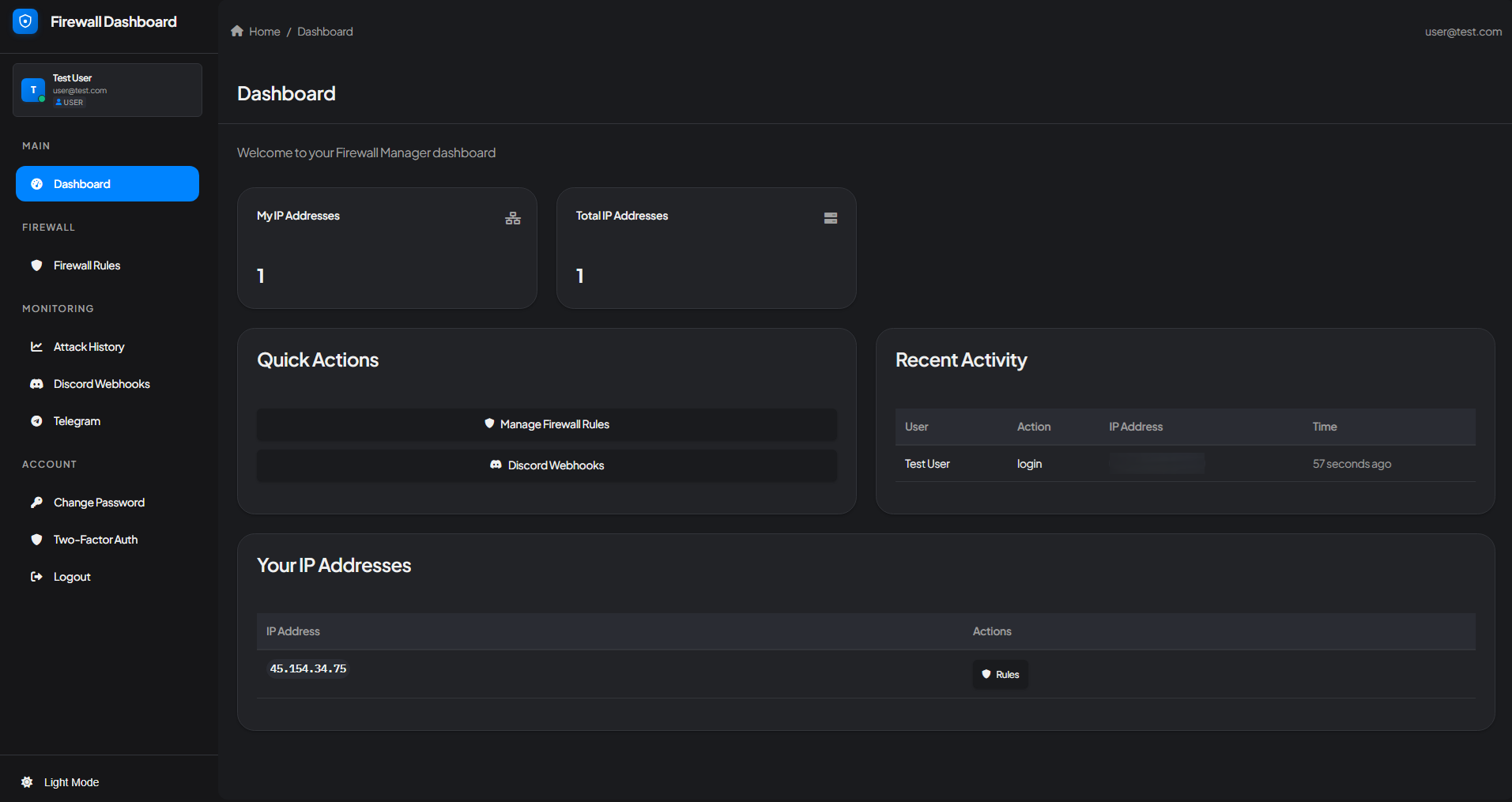
The Firewall Manager dashboard gives you a complete overview of your protected infrastructure at a glance. Key features include:
* **IP Address Management** - View and manage all your protected IP addresses
* **Quick Actions** - Instant access to firewall rules and notification settings
* **Recent Activity** - Monitor login activity and security events
* **User-Friendly Navigation** - Easy access to all firewall features from the sidebar
## What is a Firewall Manager?
A properly configured firewall is your first line of defense against unauthorized access and attacks.
A Firewall or Firewall Manager is a system that helps you to protect your server from unwanted threats and vulnerabilities while also letting it run smoothly. Our firewall leverages **GCore's global network infrastructure** to continuously monitor data packets entering and leaving your server, enforcing predefined rules that allow only legitimate traffic while blocking harmful attacks such as:
* DDoS attacks
* Unauthorized logins
* Hacking attempts
* Malicious traffic
* And many other threats
## Firewall Protection Modes
Our custom-built firewall manager is designed to be user-friendly and doesn't require extensive technical experience to operate effectively.
At Wasabi Hosting, we provide our clients and resellers with our advanced in-house firewall manager built on **GCore's enterprise-grade DDoS protection infrastructure**. Our platform combines GCore's powerful network protection with an intuitive interface to configure firewall rules, monitor DDoS attacks in real-time, manage IP addresses, and receive instant security notifications through Discord and Telegram.
Powered by [GCore's DDoS Protection](https://gcore.com/ddos-protection-gaming), our firewall delivers zero-latency mitigation and multi-layered security specifically optimized for gaming and high-performance applications.
## Dashboard Overview
The Firewall Manager dashboard gives you a complete overview of your protected infrastructure at a glance. Key features include:
* **IP Address Management** - View and manage all your protected IP addresses
* **Quick Actions** - Instant access to firewall rules and notification settings
* **Recent Activity** - Monitor login activity and security events
* **User-Friendly Navigation** - Easy access to all firewall features from the sidebar
## What is a Firewall Manager?
A properly configured firewall is your first line of defense against unauthorized access and attacks.
A Firewall or Firewall Manager is a system that helps you to protect your server from unwanted threats and vulnerabilities while also letting it run smoothly. Our firewall leverages **GCore's global network infrastructure** to continuously monitor data packets entering and leaving your server, enforcing predefined rules that allow only legitimate traffic while blocking harmful attacks such as:
* DDoS attacks
* Unauthorized logins
* Hacking attempts
* Malicious traffic
* And many other threats
## Firewall Protection Modes
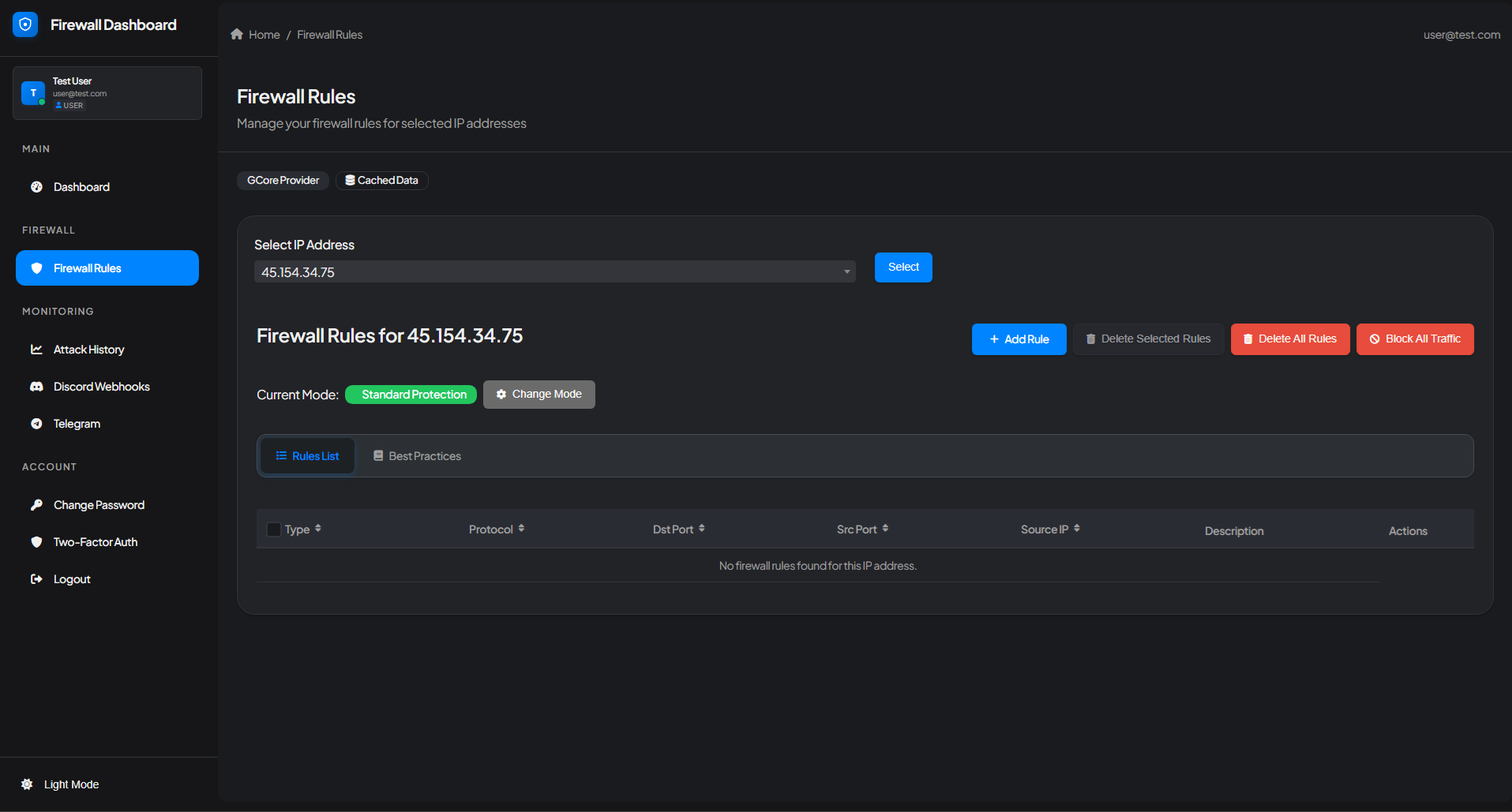 Our Firewall Manager offers two protection modes to suit different security requirements:
### Standard Protection (Recommended)
Our Firewall Manager offers two protection modes to suit different security requirements:
### Standard Protection (Recommended)
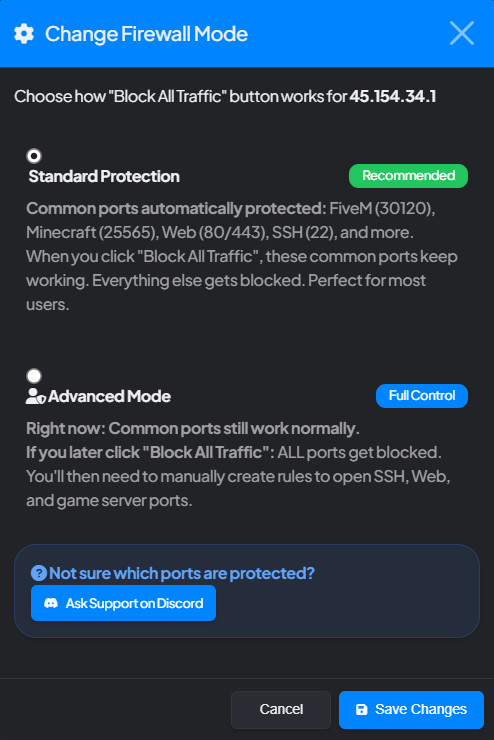 Standard Protection automatically protects common game and application ports including:
* **FiveM** (30120)
* **Minecraft** (25565)
* **Web** (80/443)
* **SSH** (22)
* And many more popular games
When you click "Block All Traffic" in Standard Protection mode, these common ports continue working while everything else gets blocked. This mode is perfect for most users as it provides robust protection without requiring manual configuration.
### Advanced Mode (Full Control)
Advanced Mode gives you complete control over your firewall rules. Initially, common ports work normally, but if you click "Block All Traffic," ALL ports get blocked. You'll then need to manually create rules to open SSH, Web, and game server ports.
Not sure which ports are protected? Click the "Change Mode" button to view detailed information about each protection mode, or ask our support team on Discord.
## Best Practices - Pre-Configured Game Templates
Standard Protection automatically protects common game and application ports including:
* **FiveM** (30120)
* **Minecraft** (25565)
* **Web** (80/443)
* **SSH** (22)
* And many more popular games
When you click "Block All Traffic" in Standard Protection mode, these common ports continue working while everything else gets blocked. This mode is perfect for most users as it provides robust protection without requiring manual configuration.
### Advanced Mode (Full Control)
Advanced Mode gives you complete control over your firewall rules. Initially, common ports work normally, but if you click "Block All Traffic," ALL ports get blocked. You'll then need to manually create rules to open SSH, Web, and game server ports.
Not sure which ports are protected? Click the "Change Mode" button to view detailed information about each protection mode, or ask our support team on Discord.
## Best Practices - Pre-Configured Game Templates
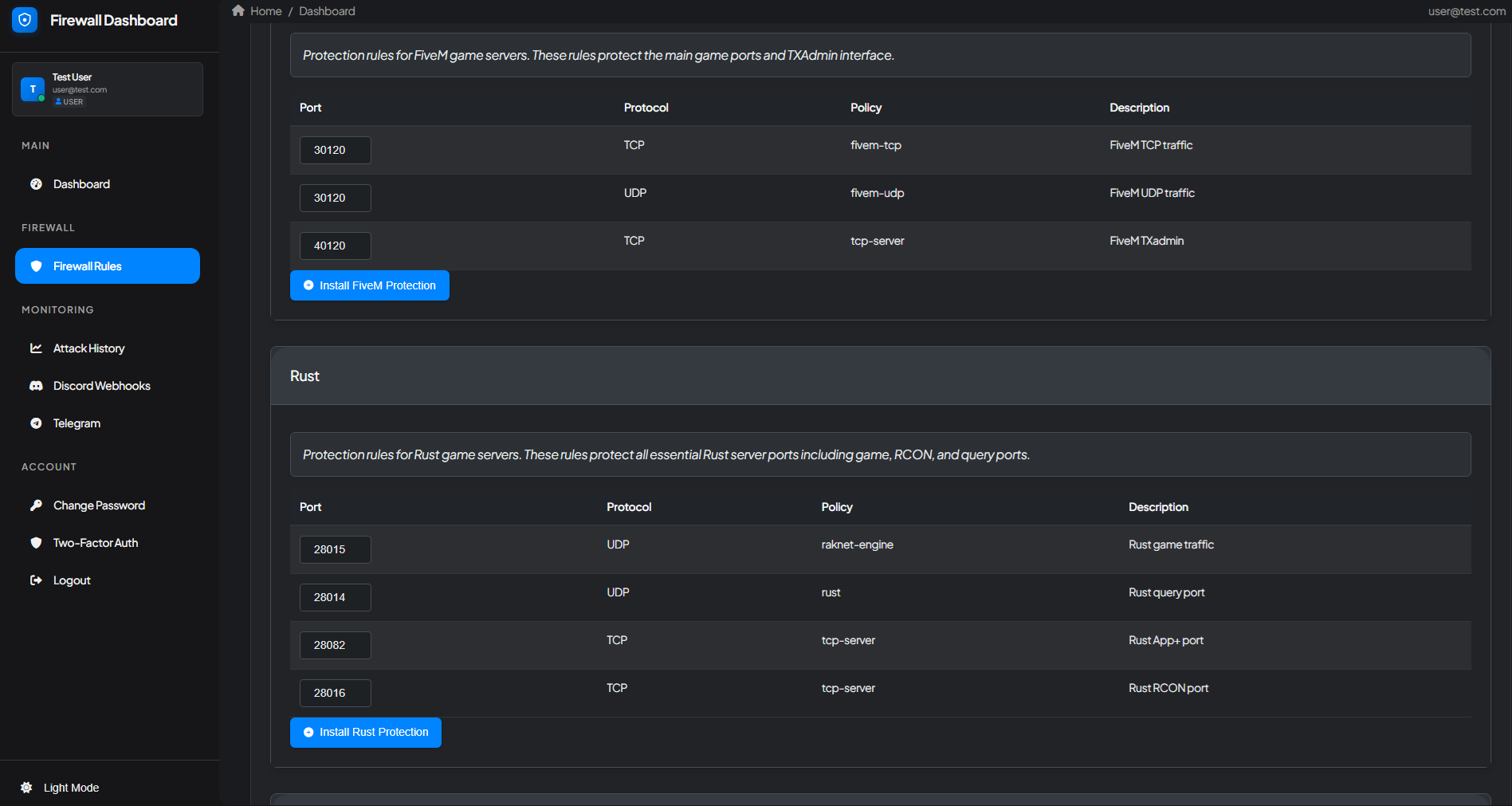 Our Firewall Manager includes professionally configured protection templates for popular game servers. These templates automatically set up all necessary firewall rules with optimized policies for your specific game:
### Available Game Templates
* **FiveM** - Protects main game ports (30120 TCP/UDP) and TXAdmin interface (40120)
* **Rust** - Protects game port (28015), query port (28014), RCON (28016), and App+ port (28082)
* **Counter-Strike** - Optimized rules for CS 1.6, CS:Source, and CS:GO/CS2
* **Minecraft** - Protection for Minecraft Java and Bedrock editions
* **Battlefield** - Templates for Battlefield 2, 3, 4, and query ports
* **Arma** - Protection for Arma 2, 3, and Arma Reforger
* And many more games
Simply click "Install \[Game] Protection" to apply all necessary rules instantly. These templates are maintained and updated by our team to ensure optimal performance and security.
Some game templates also include **A2S Query Caching** which significantly improves server browser performance and reduces query-based attack vectors.
## Firewall Rules
Firewall Rules are pre-defined instructions that determine whether incoming traffic is allowed or blocked based on factors like source IP, destination port, and protocol. These rules protect your server from unauthorized access, hacking attempts, and DDoS attacks while allowing legitimate connections.
### Creating a Custom Firewall Rule
From the dashboard, navigate to the Firewall Rules section and select your IP address.
Click the "+ Add Rule" button to create a new firewall rule.
Our Firewall Manager includes professionally configured protection templates for popular game servers. These templates automatically set up all necessary firewall rules with optimized policies for your specific game:
### Available Game Templates
* **FiveM** - Protects main game ports (30120 TCP/UDP) and TXAdmin interface (40120)
* **Rust** - Protects game port (28015), query port (28014), RCON (28016), and App+ port (28082)
* **Counter-Strike** - Optimized rules for CS 1.6, CS:Source, and CS:GO/CS2
* **Minecraft** - Protection for Minecraft Java and Bedrock editions
* **Battlefield** - Templates for Battlefield 2, 3, 4, and query ports
* **Arma** - Protection for Arma 2, 3, and Arma Reforger
* And many more games
Simply click "Install \[Game] Protection" to apply all necessary rules instantly. These templates are maintained and updated by our team to ensure optimal performance and security.
Some game templates also include **A2S Query Caching** which significantly improves server browser performance and reduces query-based attack vectors.
## Firewall Rules
Firewall Rules are pre-defined instructions that determine whether incoming traffic is allowed or blocked based on factors like source IP, destination port, and protocol. These rules protect your server from unauthorized access, hacking attempts, and DDoS attacks while allowing legitimate connections.
### Creating a Custom Firewall Rule
From the dashboard, navigate to the Firewall Rules section and select your IP address.
Click the "+ Add Rule" button to create a new firewall rule.
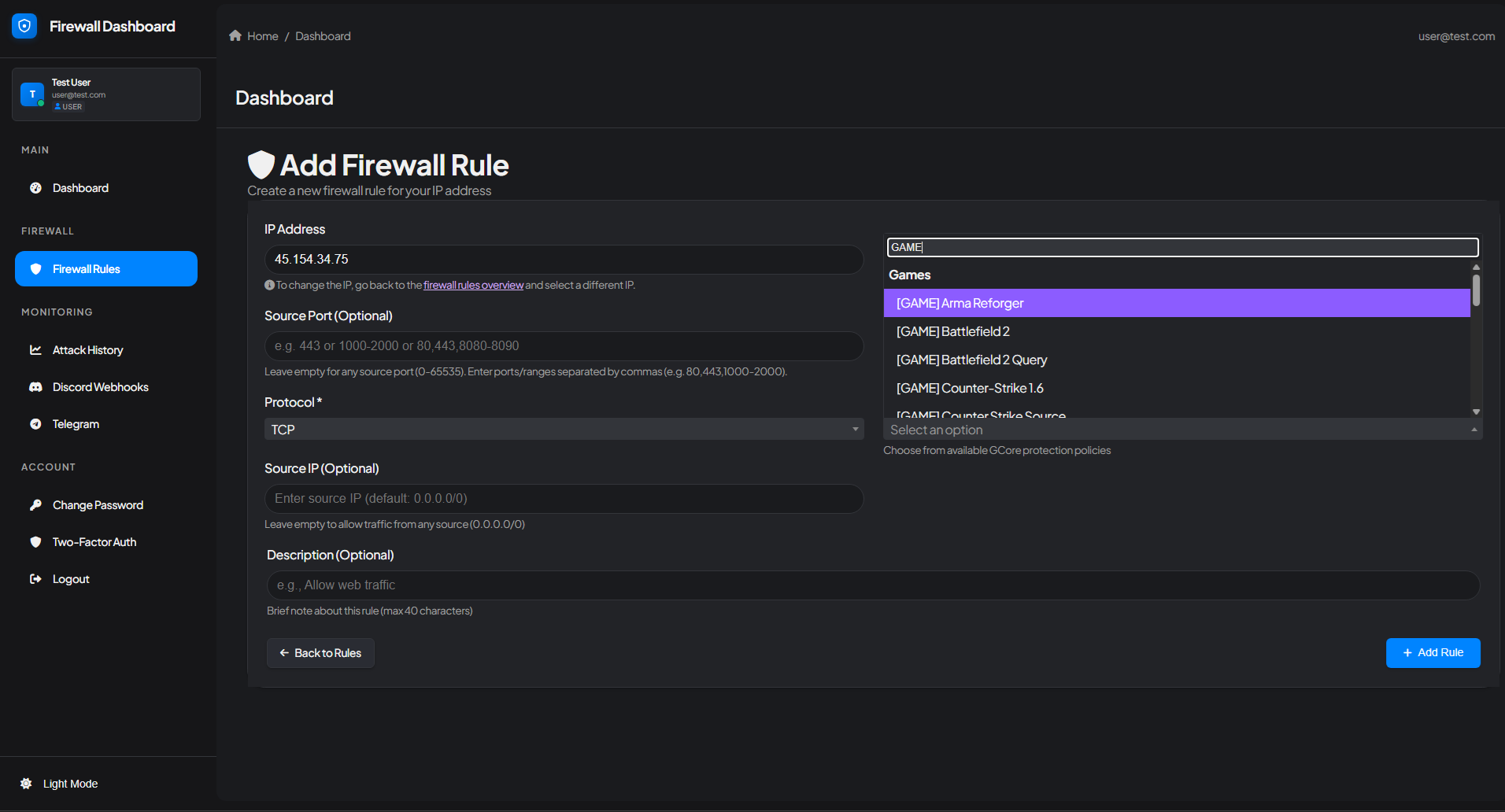 Specify the following parameters:
* **Source Port** (Optional) - Restrict traffic from specific source ports
* **Protocol** - Select TCP, UDP, or other protocols
* **Source IP** (Optional) - Whitelist or restrict specific IP addresses
* **Description** - Add a brief note about this rule (max 40 characters)
Choose from available **GCore protection policies** or select a pre-configured game template from the dropdown menu. GCore's policies are specifically optimized for different traffic types and provide industry-leading DDoS mitigation. The system includes templates for dozens of popular games.
Click "+ Add Rule" to apply the firewall rule to your server. The rule takes effect immediately.
### Managing Firewall Rules
From the Firewall Rules interface, you can:
* **Add Rule** - Create new firewall rules
* **Delete Selected Rules** - Remove multiple rules at once
* **Delete All Rules** - Clear all rules (use with caution)
* **Block All Traffic** - Emergency button to block all traffic (behavior depends on your protection mode)
* **View Best Practices** - Access pre-configured game templates
Be careful when using "Block All Traffic" or "Delete All Rules" as these actions can immediately affect your server's accessibility. In Standard Protection mode, common ports remain protected even when blocking all traffic.
### A2S Query Caching
Many of our game templates include built-in **A2S (Application to Server) Query Caching**, which significantly enhances server browser performance. A2S Caching stores responses to frequent server queries (player count, server details, map info, etc.) to optimize performance and security.
* **Reduced server load** - Caching minimizes direct queries to your game server
* **Lower latency** - Players see server information faster in their server browser
* **Improved stability** - Less strain on server resources during peak times
* **Protection against query floods** - Acts as a buffer against query-based DDoS attacks
* **Better server browser visibility** - Faster response times improve your server's listing position
Games that currently benefit from A2S Caching include **Counter-Strike** (CS:GO/CS2, CS:Source, CS 1.6), **Team Fortress 2**, **Garry's Mod**, **Rust**, and other Source engine games. This feature is automatically enabled when you use our pre-configured game templates.
## Attack History & Monitoring
Specify the following parameters:
* **Source Port** (Optional) - Restrict traffic from specific source ports
* **Protocol** - Select TCP, UDP, or other protocols
* **Source IP** (Optional) - Whitelist or restrict specific IP addresses
* **Description** - Add a brief note about this rule (max 40 characters)
Choose from available **GCore protection policies** or select a pre-configured game template from the dropdown menu. GCore's policies are specifically optimized for different traffic types and provide industry-leading DDoS mitigation. The system includes templates for dozens of popular games.
Click "+ Add Rule" to apply the firewall rule to your server. The rule takes effect immediately.
### Managing Firewall Rules
From the Firewall Rules interface, you can:
* **Add Rule** - Create new firewall rules
* **Delete Selected Rules** - Remove multiple rules at once
* **Delete All Rules** - Clear all rules (use with caution)
* **Block All Traffic** - Emergency button to block all traffic (behavior depends on your protection mode)
* **View Best Practices** - Access pre-configured game templates
Be careful when using "Block All Traffic" or "Delete All Rules" as these actions can immediately affect your server's accessibility. In Standard Protection mode, common ports remain protected even when blocking all traffic.
### A2S Query Caching
Many of our game templates include built-in **A2S (Application to Server) Query Caching**, which significantly enhances server browser performance. A2S Caching stores responses to frequent server queries (player count, server details, map info, etc.) to optimize performance and security.
* **Reduced server load** - Caching minimizes direct queries to your game server
* **Lower latency** - Players see server information faster in their server browser
* **Improved stability** - Less strain on server resources during peak times
* **Protection against query floods** - Acts as a buffer against query-based DDoS attacks
* **Better server browser visibility** - Faster response times improve your server's listing position
Games that currently benefit from A2S Caching include **Counter-Strike** (CS:GO/CS2, CS:Source, CS 1.6), **Team Fortress 2**, **Garry's Mod**, **Rust**, and other Source engine games. This feature is automatically enabled when you use our pre-configured game templates.
## Attack History & Monitoring
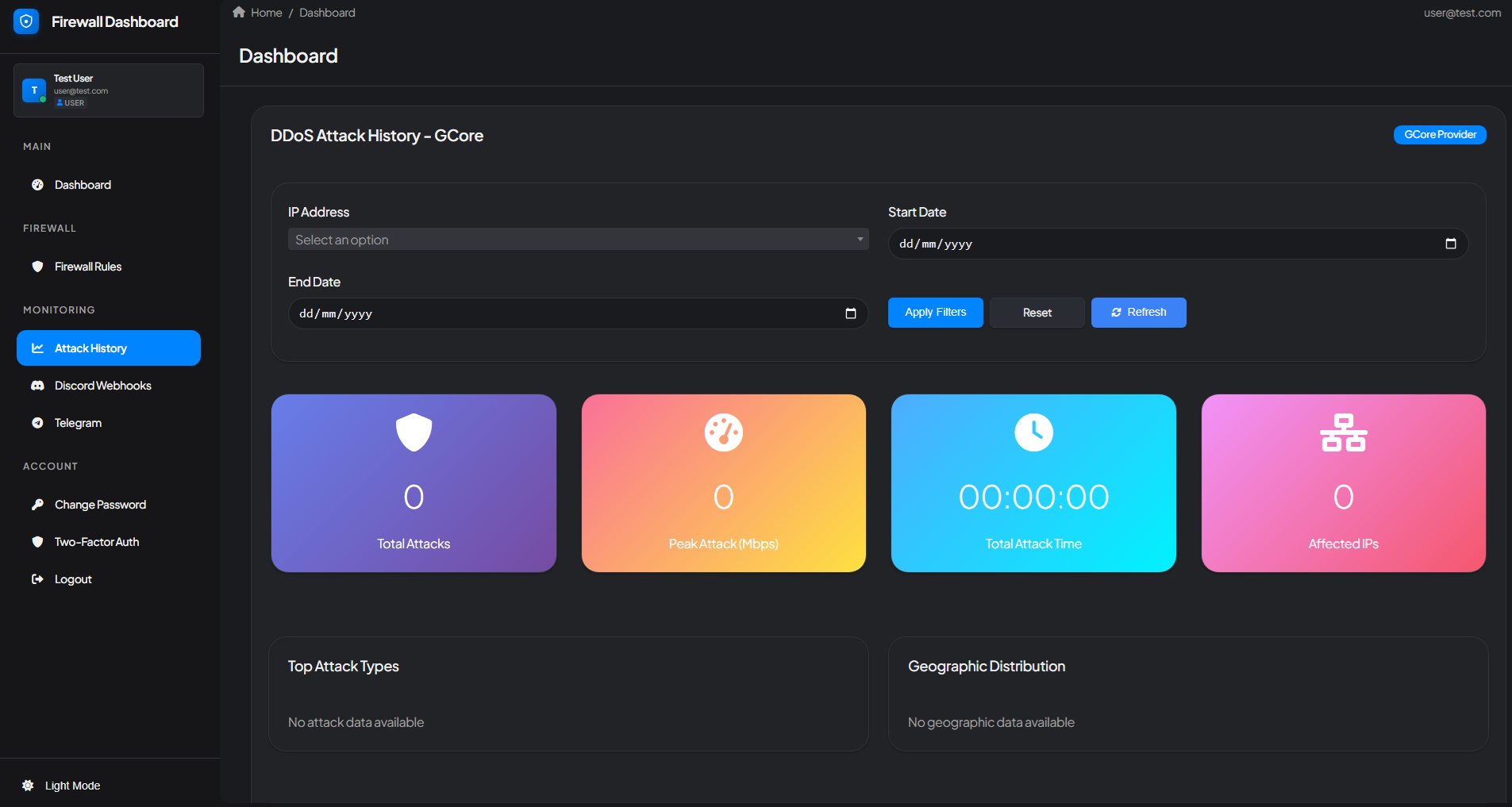 Our comprehensive Attack History dashboard, powered by **GCore's advanced threat intelligence**, provides detailed insights into all DDoS attacks targeting your infrastructure. Monitor both real-time and historical attack data with powerful filtering and analytics capabilities.
### Attack History Features
The Attack History page displays:
* **Total Attacks** - Complete count of all attacks on your infrastructure
* **Peak Attack Power** - Maximum attack strength measured in Gbps/Mbps
* **Total Attack Time** - Cumulative duration of all attacks
* **Affected IP Addresses** - Number of unique IPs targeted
* **Attack Type Distribution** - Breakdown of different attack vectors
* **Geographic Distribution** - Visual map showing attack source locations
* **Custom Date Range Filtering** - Filter attacks by specific time periods
### Detailed Attack Analysis
Our comprehensive Attack History dashboard, powered by **GCore's advanced threat intelligence**, provides detailed insights into all DDoS attacks targeting your infrastructure. Monitor both real-time and historical attack data with powerful filtering and analytics capabilities.
### Attack History Features
The Attack History page displays:
* **Total Attacks** - Complete count of all attacks on your infrastructure
* **Peak Attack Power** - Maximum attack strength measured in Gbps/Mbps
* **Total Attack Time** - Cumulative duration of all attacks
* **Affected IP Addresses** - Number of unique IPs targeted
* **Attack Type Distribution** - Breakdown of different attack vectors
* **Geographic Distribution** - Visual map showing attack source locations
* **Custom Date Range Filtering** - Filter attacks by specific time periods
### Detailed Attack Analysis
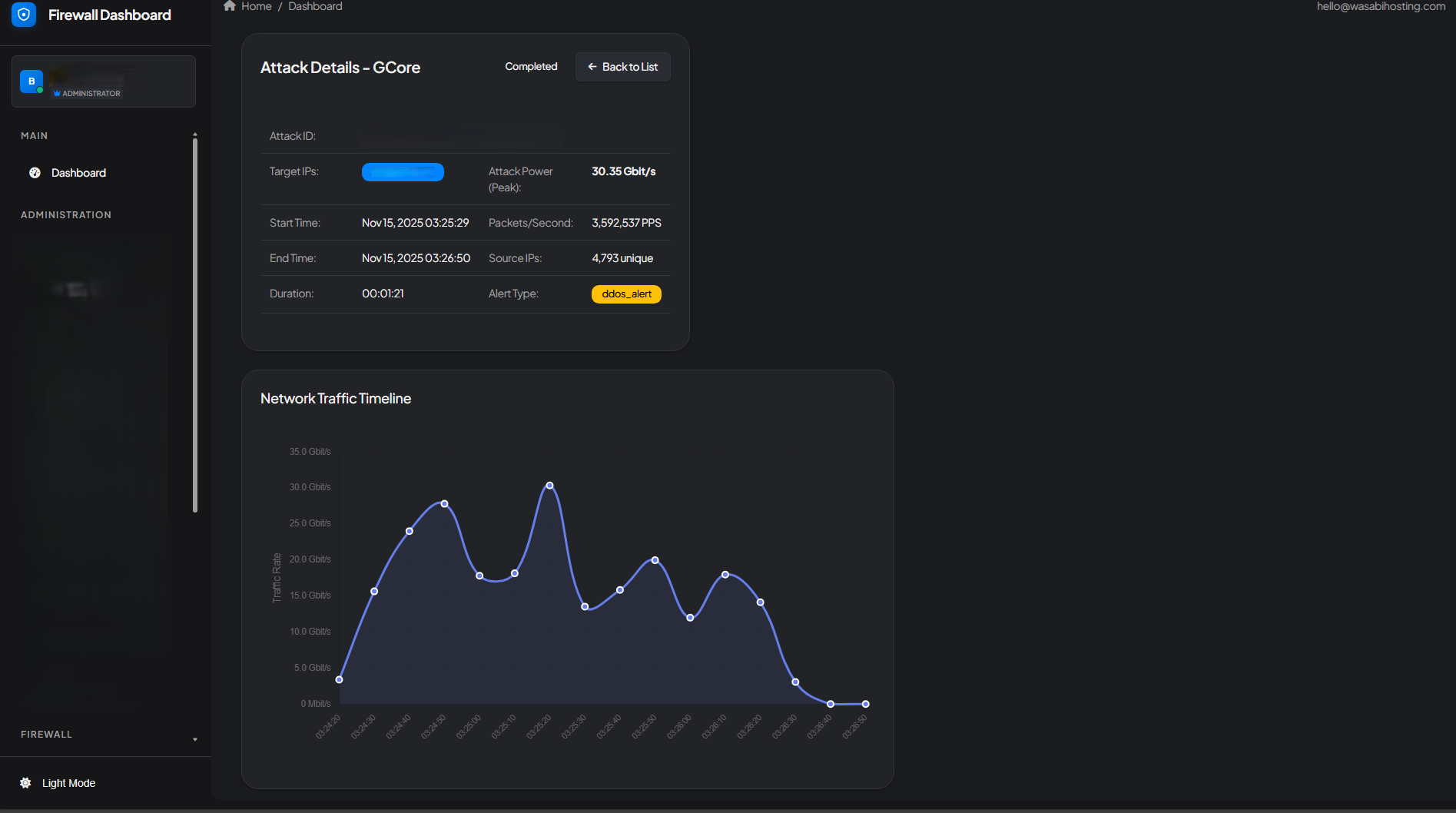 Click on any attack to view comprehensive details including:
* **Attack ID & Status** - Unique identifier and current state (Completed/Ongoing)
* **Target IP Address** - Affected server IP
* **Attack Power (Peak)** - Maximum bandwidth reached during the attack
* **Packets per Second (PPS)** - Attack intensity measurement
* **Start & End Time** - Precise attack timeline
* **Duration** - Total length of the attack
* **Source IPs** - Number of unique attacking IP addresses
* **Alert Type** - Classification of the attack (e.g., ddos\_alert)
* **Network Traffic Timeline** - Visual graph showing attack intensity over time
### Advanced Attack Analytics
Click on any attack to view comprehensive details including:
* **Attack ID & Status** - Unique identifier and current state (Completed/Ongoing)
* **Target IP Address** - Affected server IP
* **Attack Power (Peak)** - Maximum bandwidth reached during the attack
* **Packets per Second (PPS)** - Attack intensity measurement
* **Start & End Time** - Precise attack timeline
* **Duration** - Total length of the attack
* **Source IPs** - Number of unique attacking IP addresses
* **Alert Type** - Classification of the attack (e.g., ddos\_alert)
* **Network Traffic Timeline** - Visual graph showing attack intensity over time
### Advanced Attack Analytics
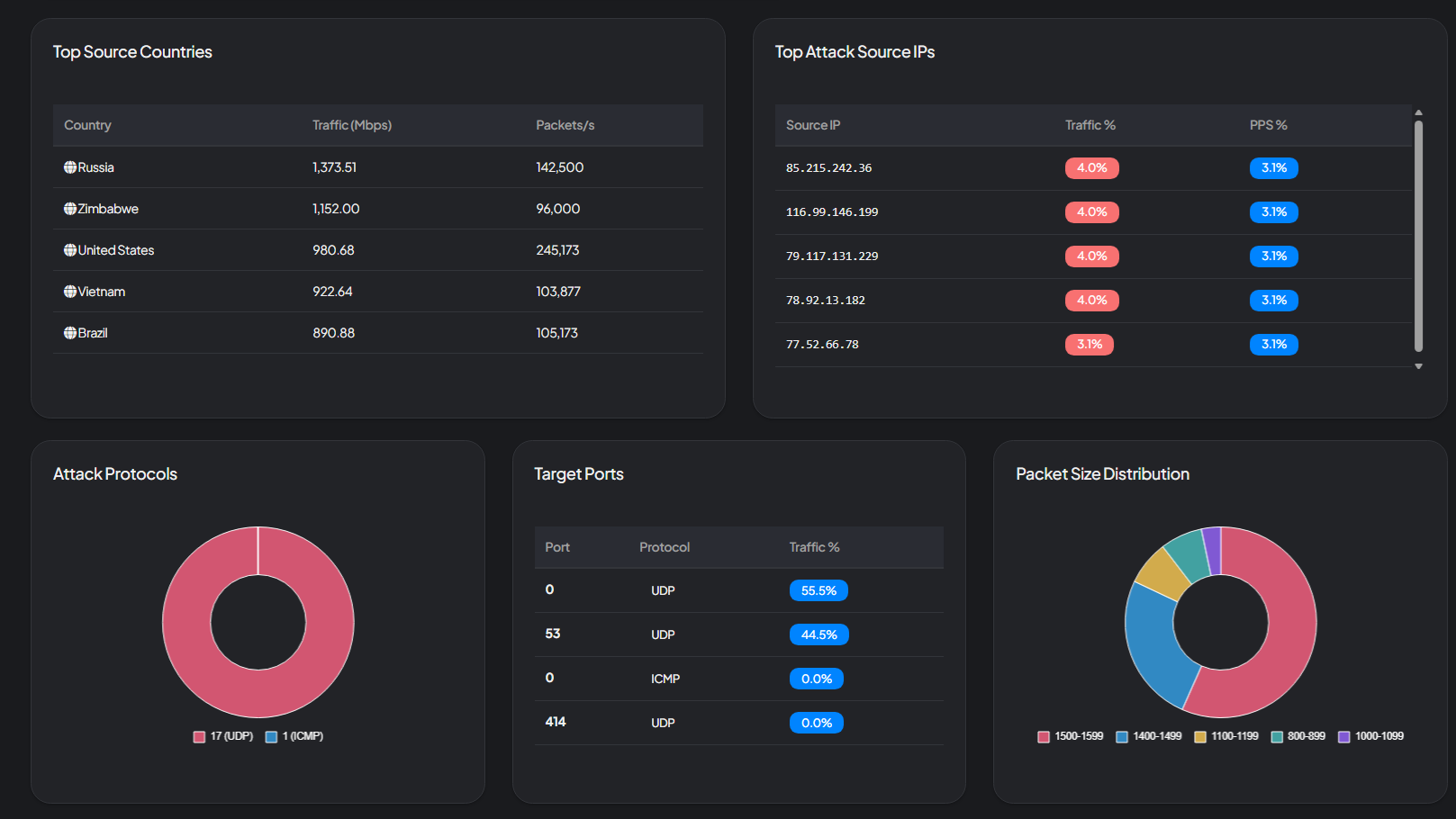 Our advanced analytics provide deep insights into attack patterns:
#### Top Source Countries
View the geographic origin of attacks with detailed breakdowns including:
* Country flags for easy identification
* Traffic volume in Mbps from each country
* Packets per second (PPS) from each source
#### Top Attack Source IPs
Identify the most aggressive attacking IP addresses with:
* Individual IP addresses
* Traffic percentage contribution
* PPS percentage metrics
#### Attack Protocols
Visualize attack protocol distribution:
* UDP flood attacks
* ICMP attacks
* TCP-based attacks
* Protocol-specific pie charts
#### Target Ports
See which ports were targeted:
* Port numbers
* Protocol types (UDP/TCP/ICMP)
* Traffic percentage per port
#### Packet Size Distribution
Analyze attack packet characteristics:
* Packet size ranges (bytes)
* Distribution percentages
* Attack pattern identification
## Real-Time Notifications
Stay informed about security events instantly with our notification integrations. Receive alerts directly in Discord or Telegram whenever an attack starts or stops.
### Discord Webhook Integration
Our advanced analytics provide deep insights into attack patterns:
#### Top Source Countries
View the geographic origin of attacks with detailed breakdowns including:
* Country flags for easy identification
* Traffic volume in Mbps from each country
* Packets per second (PPS) from each source
#### Top Attack Source IPs
Identify the most aggressive attacking IP addresses with:
* Individual IP addresses
* Traffic percentage contribution
* PPS percentage metrics
#### Attack Protocols
Visualize attack protocol distribution:
* UDP flood attacks
* ICMP attacks
* TCP-based attacks
* Protocol-specific pie charts
#### Target Ports
See which ports were targeted:
* Port numbers
* Protocol types (UDP/TCP/ICMP)
* Traffic percentage per port
#### Packet Size Distribution
Analyze attack packet characteristics:
* Packet size ranges (bytes)
* Distribution percentages
* Attack pattern identification
## Real-Time Notifications
Stay informed about security events instantly with our notification integrations. Receive alerts directly in Discord or Telegram whenever an attack starts or stops.
### Discord Webhook Integration
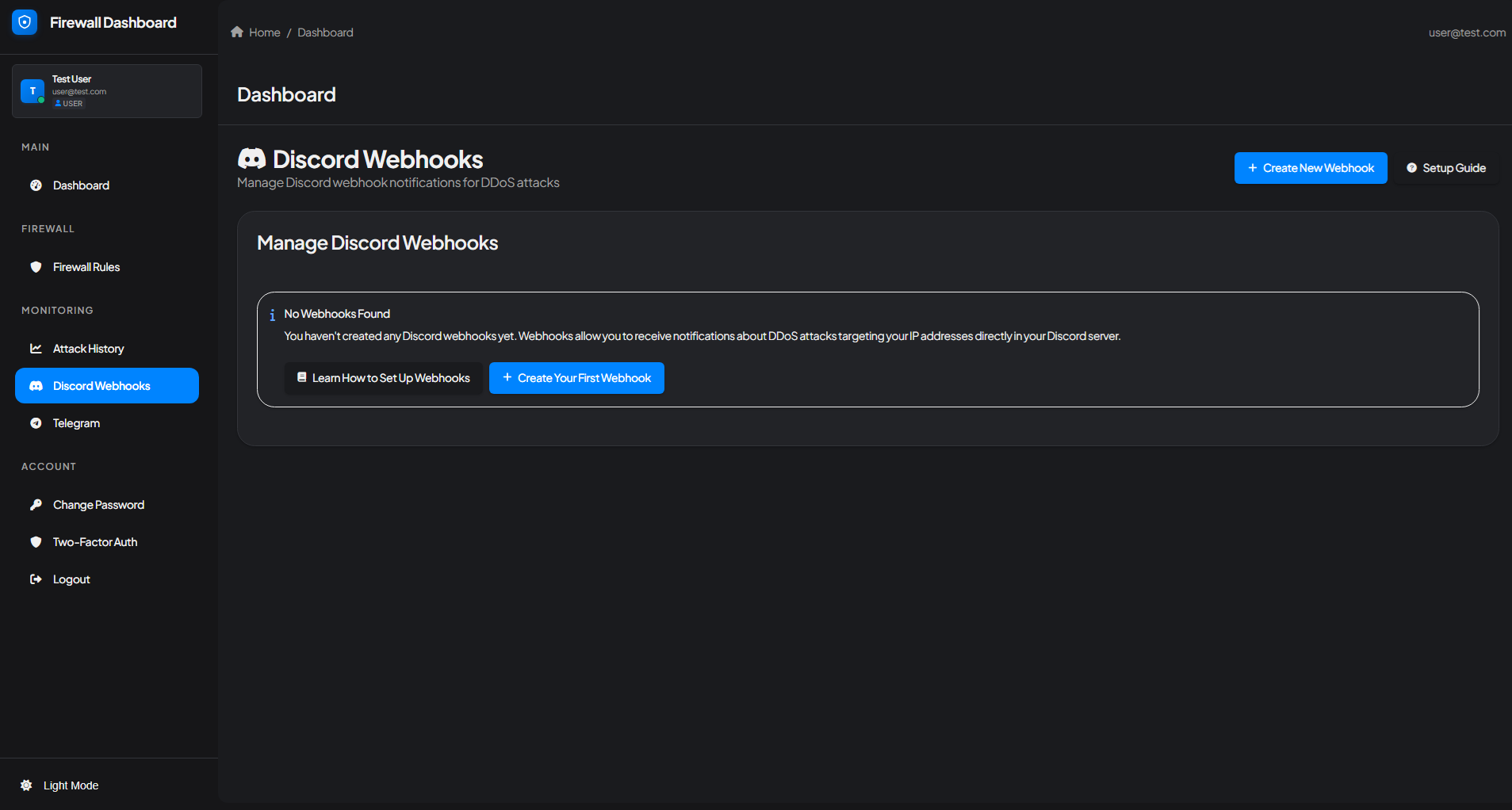 Get instant DDoS attack notifications sent directly to your Discord server, even when you're away from the management panel.
Discord webhooks allow you to receive real-time notifications about DDoS attacks targeting your IP addresses directly in your Discord server. Each notification includes:
* Attack start/stop timestamps
* Target IP address
* Attack power and intensity
* Attack duration
* Source information
To set up Discord webhooks:
1. Navigate to the **Discord Webhooks** section from the sidebar
2. Click **"+ Create New Webhook"** or **"Create Your First Webhook"**
3. Follow the setup guide at [firewall.wasabihosting.com/user/webhooks/guide](https://firewall.wasabihosting.com/user/webhooks/guide)
4. Configure your Discord server webhook URL
5. Start receiving instant attack notifications
### Telegram Bot Integration
Get instant DDoS attack notifications sent directly to your Discord server, even when you're away from the management panel.
Discord webhooks allow you to receive real-time notifications about DDoS attacks targeting your IP addresses directly in your Discord server. Each notification includes:
* Attack start/stop timestamps
* Target IP address
* Attack power and intensity
* Attack duration
* Source information
To set up Discord webhooks:
1. Navigate to the **Discord Webhooks** section from the sidebar
2. Click **"+ Create New Webhook"** or **"Create Your First Webhook"**
3. Follow the setup guide at [firewall.wasabihosting.com/user/webhooks/guide](https://firewall.wasabihosting.com/user/webhooks/guide)
4. Configure your Discord server webhook URL
5. Start receiving instant attack notifications
### Telegram Bot Integration
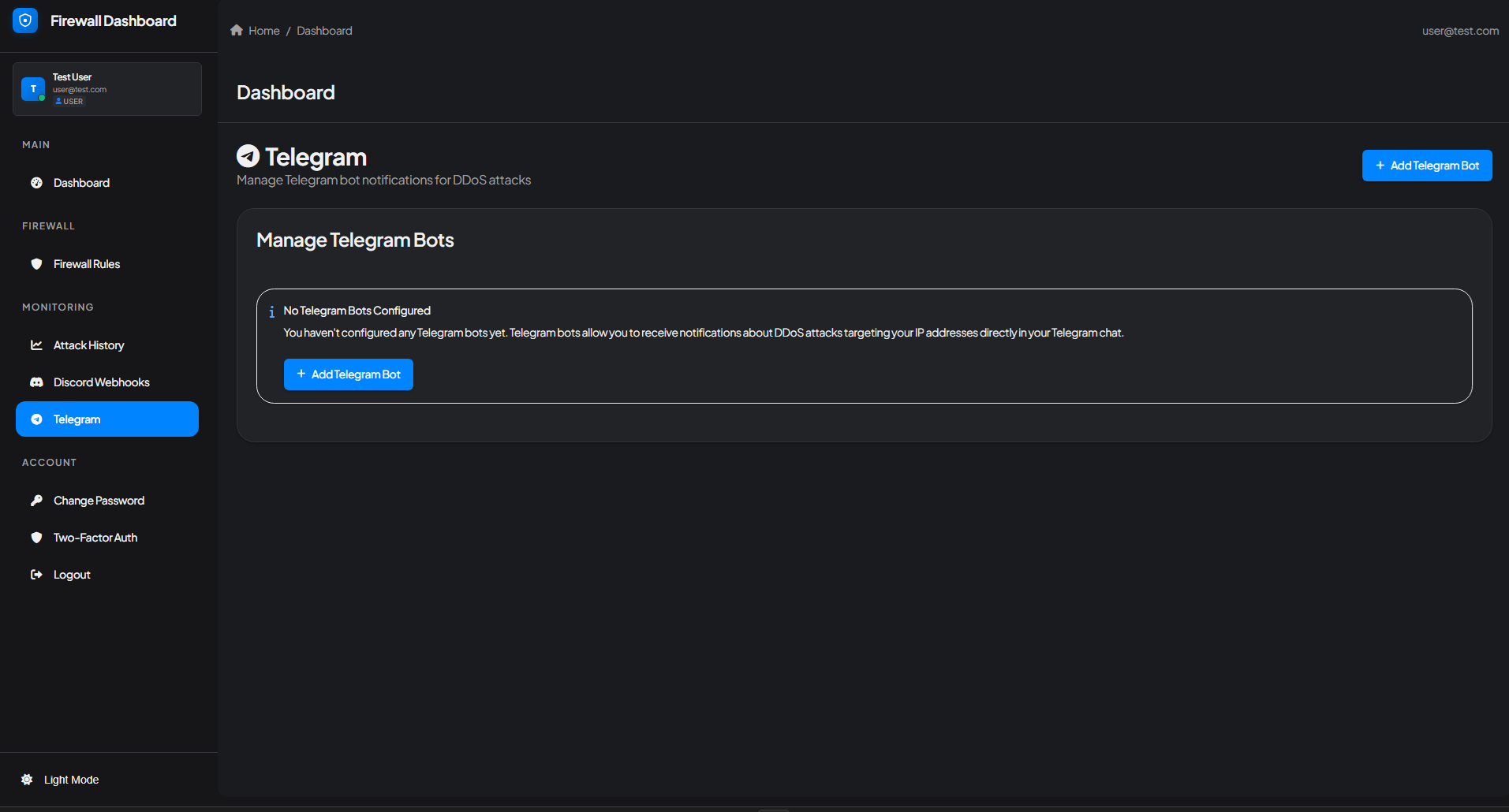 Prefer Telegram? Our Telegram bot integration sends the same comprehensive attack notifications directly to your Telegram chat.
To set up Telegram notifications:
1. Navigate to the **Telegram** section from the sidebar
2. Click **"+ Add Telegram Bot"**
3. Follow the configuration steps
4. Link your Telegram account
5. Receive instant DDoS attack alerts in Telegram
## Account Security
### Two-Factor Authentication (2FA)
Prefer Telegram? Our Telegram bot integration sends the same comprehensive attack notifications directly to your Telegram chat.
To set up Telegram notifications:
1. Navigate to the **Telegram** section from the sidebar
2. Click **"+ Add Telegram Bot"**
3. Follow the configuration steps
4. Link your Telegram account
5. Receive instant DDoS attack alerts in Telegram
## Account Security
### Two-Factor Authentication (2FA)
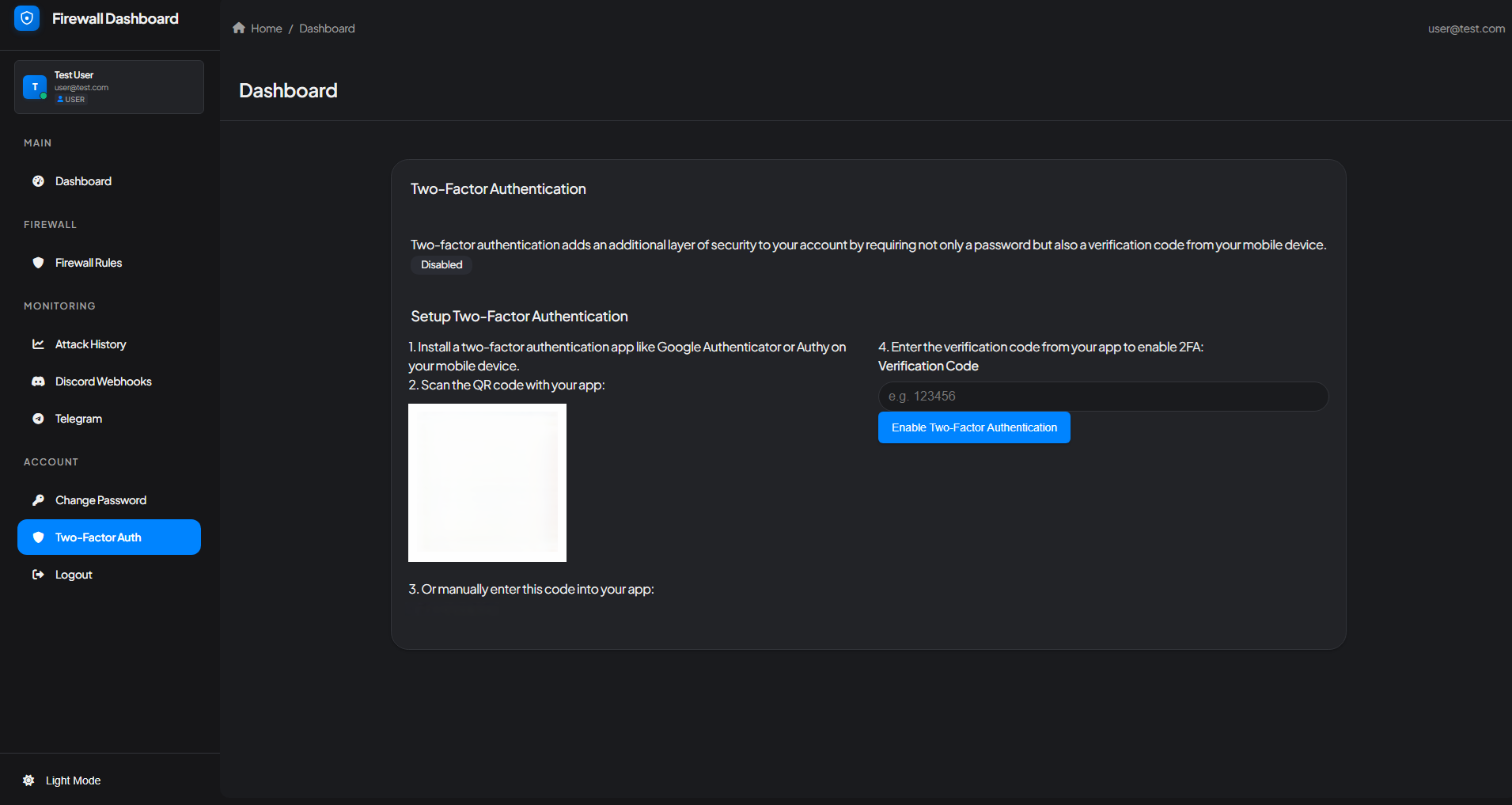 Protect your Firewall Manager account with an additional layer of security using Two-Factor Authentication.
Two-factor authentication (2FA) adds an extra security layer to your account by requiring both a password and a verification code from your mobile device. This prevents unauthorized access even if your password is compromised.
#### Setting Up 2FA
Download and install a two-factor authentication app on your mobile device:
* **Google Authenticator** (iOS/Android)
* **Authy** (iOS/Android)
* **Microsoft Authenticator** (iOS/Android)
Navigate to **Account > Two-Factor Auth** in the sidebar and scan the displayed QR code with your authentication app.
If you can't scan the QR code, manually enter the provided code into your authentication app.
Enter the 6-digit verification code from your app and click **"Enable Two-Factor Authentication"** to activate 2FA on your account.
Once enabled, you'll need to enter a verification code from your authenticator app each time you log in to the Firewall Manager.
## Reseller & Enterprise Options
Wasabi Hosting offers comprehensive reseller and enterprise solutions for customers looking to resell our DDoS protection services or purchase dedicated servers with large IP allocations.
Our Firewall Manager includes a dedicated reseller portal with advanced tools for managing customers, IP addresses, and complete whitelabel customization. Whether you're a hosting provider, game server network, or enterprise client, our reseller program provides everything you need to offer premium DDoS protection under your own brand.
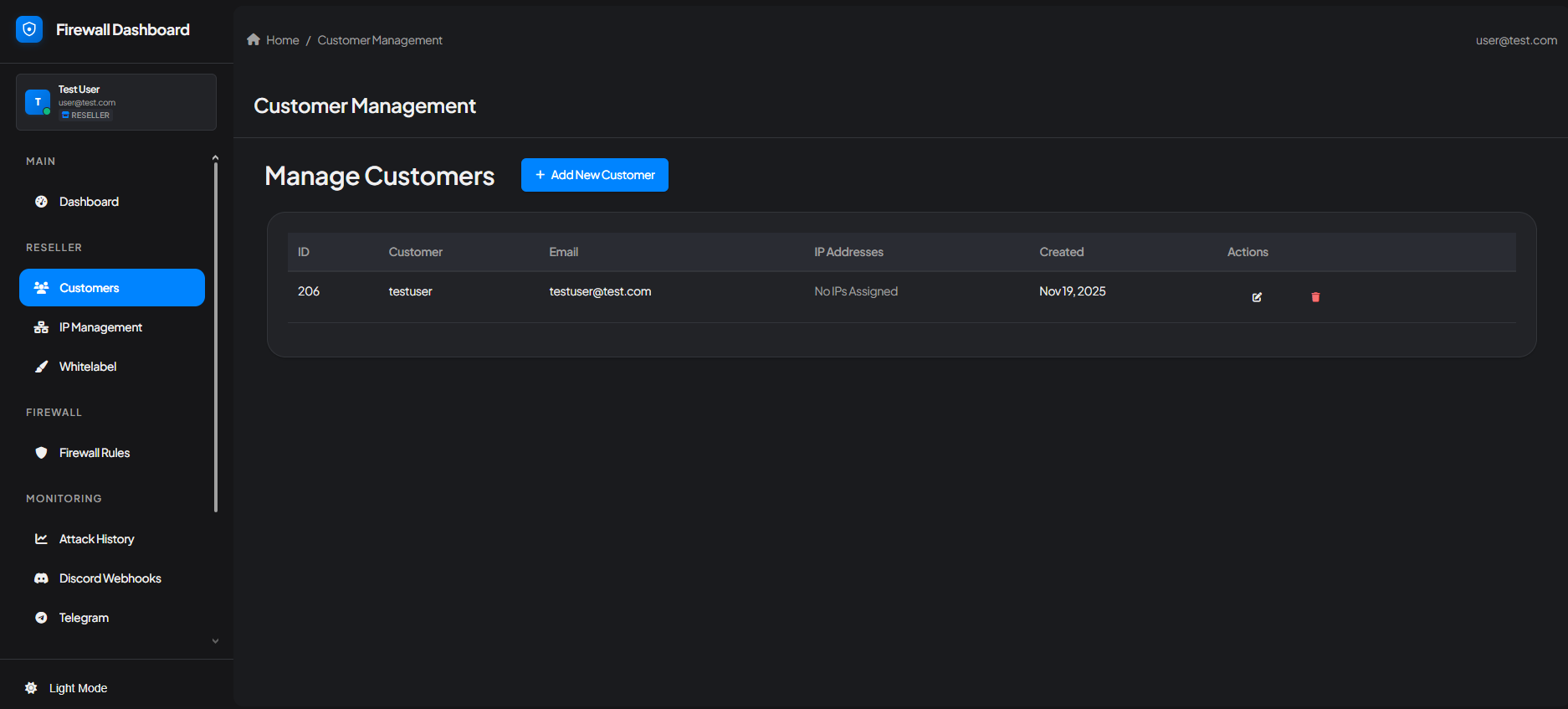
The Customer Management interface allows resellers to efficiently manage their entire client base:
* **Add New Customers** - Onboard new clients with dedicated firewall access
* **View Customer Details** - Monitor client account information and activity
* **Delete Customers** - Remove inactive or churned clients
* **IP Assignment Tracking** - See which IP addresses are assigned to each customer
* **Bulk Operations** - Manage multiple customers simultaneously
Protect your Firewall Manager account with an additional layer of security using Two-Factor Authentication.
Two-factor authentication (2FA) adds an extra security layer to your account by requiring both a password and a verification code from your mobile device. This prevents unauthorized access even if your password is compromised.
#### Setting Up 2FA
Download and install a two-factor authentication app on your mobile device:
* **Google Authenticator** (iOS/Android)
* **Authy** (iOS/Android)
* **Microsoft Authenticator** (iOS/Android)
Navigate to **Account > Two-Factor Auth** in the sidebar and scan the displayed QR code with your authentication app.
If you can't scan the QR code, manually enter the provided code into your authentication app.
Enter the 6-digit verification code from your app and click **"Enable Two-Factor Authentication"** to activate 2FA on your account.
Once enabled, you'll need to enter a verification code from your authenticator app each time you log in to the Firewall Manager.
## Reseller & Enterprise Options
Wasabi Hosting offers comprehensive reseller and enterprise solutions for customers looking to resell our DDoS protection services or purchase dedicated servers with large IP allocations.
Our Firewall Manager includes a dedicated reseller portal with advanced tools for managing customers, IP addresses, and complete whitelabel customization. Whether you're a hosting provider, game server network, or enterprise client, our reseller program provides everything you need to offer premium DDoS protection under your own brand.
The Customer Management interface allows resellers to efficiently manage their entire client base:
* **Add New Customers** - Onboard new clients with dedicated firewall access
* **View Customer Details** - Monitor client account information and activity
* **Delete Customers** - Remove inactive or churned clients
* **IP Assignment Tracking** - See which IP addresses are assigned to each customer
* **Bulk Operations** - Manage multiple customers simultaneously
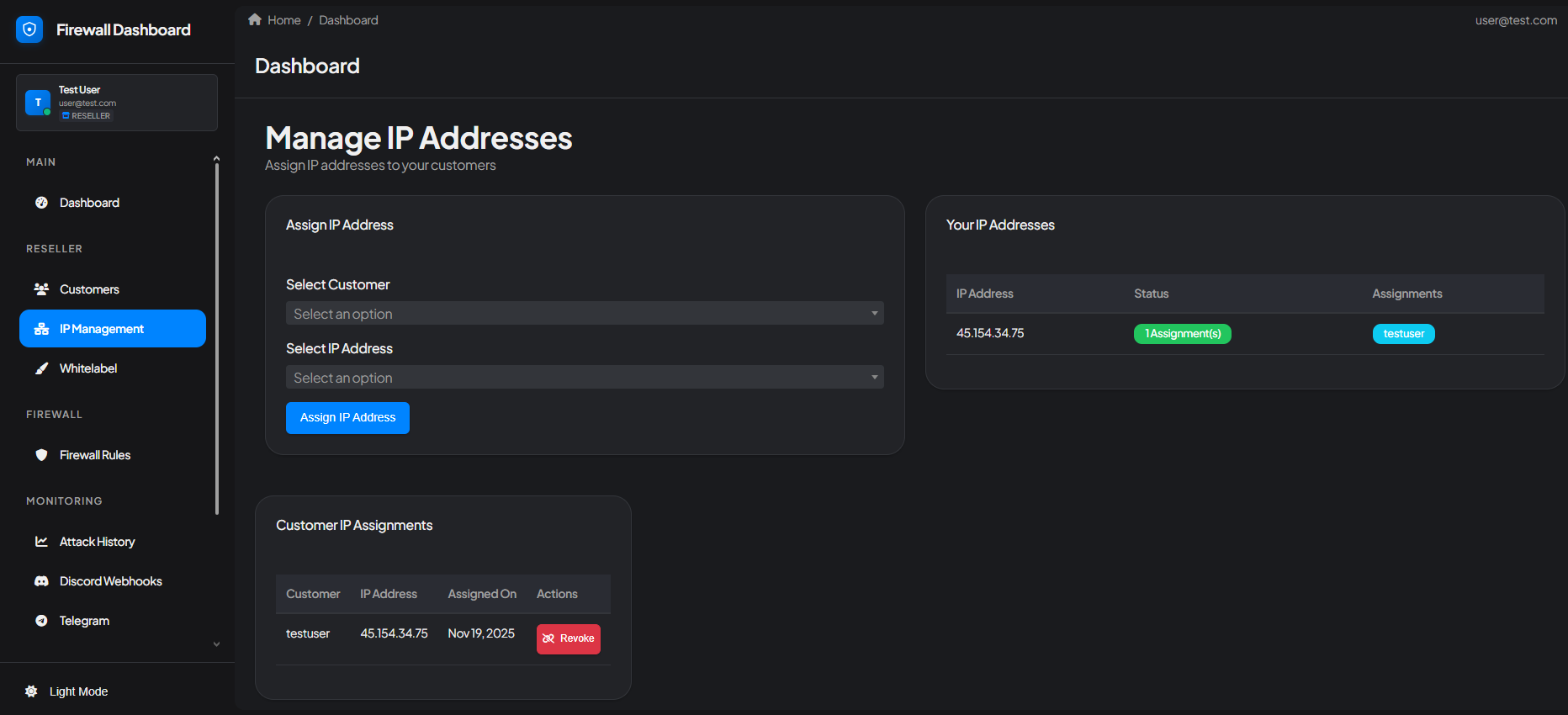
 Comprehensive IP address allocation and management for your reseller business:
* **Assign IP Addresses** - Allocate protected IPs to specific customers
* **Reassign IPs** - Transfer IP addresses between customers as needed
* **Revoke Access** - Remove IP assignments from customers
* **View IP Pool** - Monitor your available and allocated IP inventory
* **Bulk IP Operations** - Manage multiple IPs efficiently
Comprehensive IP address allocation and management for your reseller business:
* **Assign IP Addresses** - Allocate protected IPs to specific customers
* **Reassign IPs** - Transfer IP addresses between customers as needed
* **Revoke Access** - Remove IP assignments from customers
* **View IP Pool** - Monitor your available and allocated IP inventory
* **Bulk IP Operations** - Manage multiple IPs efficiently
 For customers purchasing dedicated servers with large IP allocations, we can provide custom IP blocks and subnet management.
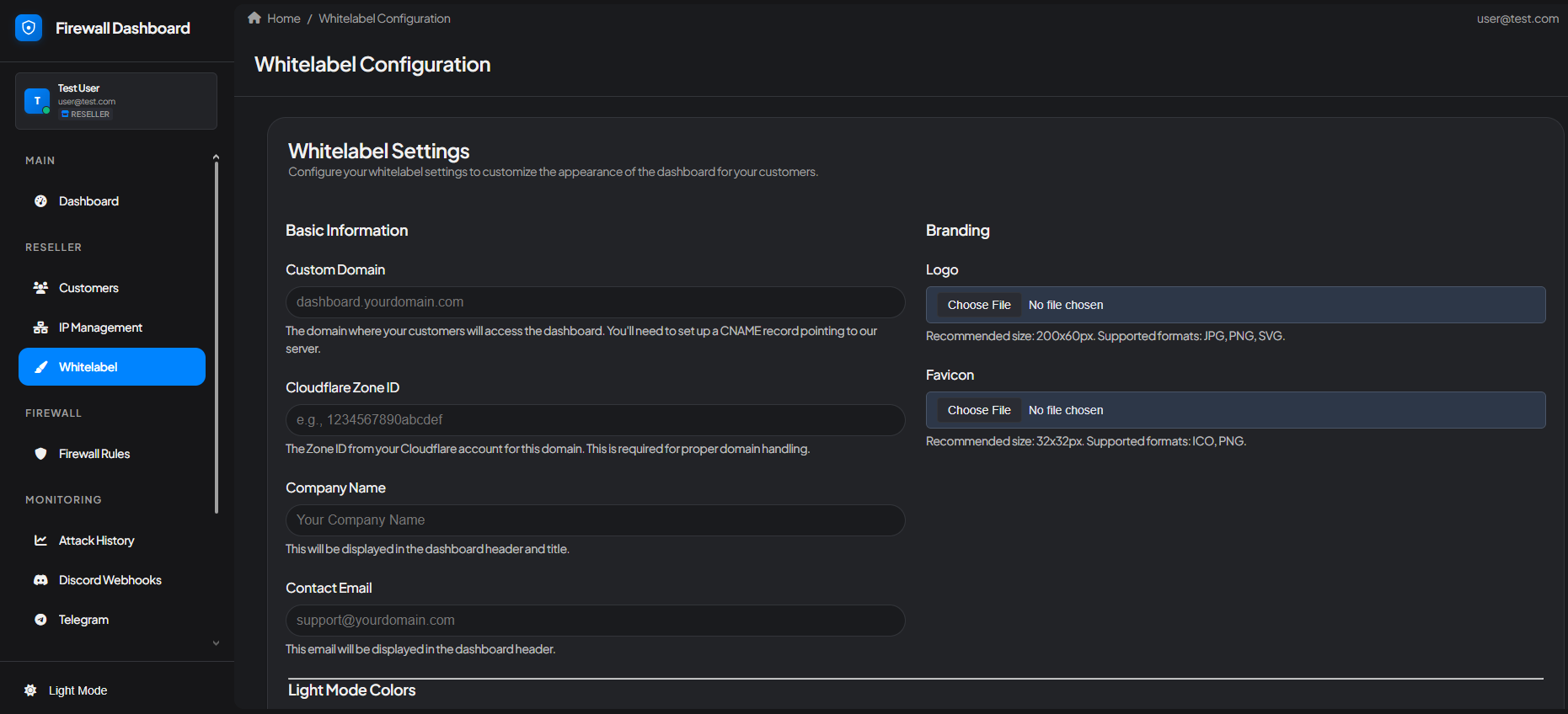
Complete whitelabel customization allows you to offer DDoS protection under your own brand:
### Whitelabel Features
* **Custom Domain (CNAME)** - Use your own domain for the firewall panel (e.g., firewall.yourdomain.com)
* **Custom Logo** - Upload your company logo to replace Wasabi Hosting branding
* **Custom Colors** - Adjust the color scheme to match your brand identity
* **Custom Branding Elements** - Personalize the interface with your company name and styling
* **Cloudflare Captcha Support** - Integrated Cloudflare captcha protection for additional security
* **Seamless Client Experience** - Your customers see only your branding, not ours
For customers purchasing dedicated servers with large IP allocations, we can provide custom IP blocks and subnet management.
Complete whitelabel customization allows you to offer DDoS protection under your own brand:
### Whitelabel Features
* **Custom Domain (CNAME)** - Use your own domain for the firewall panel (e.g., firewall.yourdomain.com)
* **Custom Logo** - Upload your company logo to replace Wasabi Hosting branding
* **Custom Colors** - Adjust the color scheme to match your brand identity
* **Custom Branding Elements** - Personalize the interface with your company name and styling
* **Cloudflare Captcha Support** - Integrated Cloudflare captcha protection for additional security
* **Seamless Client Experience** - Your customers see only your branding, not ours
 The whitelabel feature is perfect for hosting companies, game server networks, and managed service providers who want to maintain their brand identity while leveraging **GCore's enterprise-grade DDoS protection infrastructure**.
### Enterprise & Dedicated Server Solutions
For larger operations, we offer:
* **Dedicated Servers** - Full servers with large IP allocations for maximum control
* **Custom IP Blocks** - /24, /23, or larger subnet allocations
* **Custom CNAME Domains** - Host the firewall panel on your own domain
* **Personalized Onboarding Support** - Dedicated support during setup and migration
* **Volume Pricing** - Competitive rates for bulk IP purchases
* **Priority Support** - Faster response times and dedicated account management
### Getting Started as a Reseller
To access the reseller portal and whitelabel features, you need to be approved as a Wasabi Hosting reseller.
Create a support ticket on our [website](https://wasabihosting.com/) or [Discord server](https://discord.wasabihosting.com) expressing your interest in becoming a reseller.
Our team will discuss your needs, including:
* Number of IPs required
* Whitelabel/custom domain requirements
* Expected customer volume
* Dedicated server options (if applicable)
Once approved, our staff will:
* Enable reseller access on your firewall account
* Configure whitelabel settings
* Set up custom CNAME domain (if requested)
* Provide onboarding documentation
Begin adding customers and managing your DDoS protection business through the reseller portal.
## Conclusion
The Wasabi Hosting Firewall Manager is a comprehensive DDoS protection platform built on **GCore's global network infrastructure**, designed to keep your game servers and applications secure. With features ranging from automated game-specific protection templates and dual-mode firewall operation to advanced attack analytics and real-time notifications, you have everything needed to defend against modern cyber threats.
### Key Takeaways
* **GCore-Powered Protection** - Enterprise-grade DDoS mitigation built on GCore's global network infrastructure
* **Easy Protection Modes** - Choose between Standard Protection for automatic security or Advanced Mode for complete control
* **Pre-Configured Templates** - One-click game protection for FiveM, Rust, Minecraft, Counter-Strike, and many more
* **A2S Query Caching** - Built-in performance optimization for Source engine games
* **Comprehensive Monitoring** - Detailed attack analytics with geographic distribution and protocol analysis powered by GCore's threat intelligence
* **Real-Time Alerts** - Instant notifications via Discord and Telegram
* **Account Security** - Two-factor authentication to protect your firewall account
* **Reseller Ready** - Full whitelabel options with custom domains for hosting providers
Whether you're protecting a single game server or managing DDoS protection for hundreds of clients as a reseller, our Firewall Manager provides the tools, insights, and flexibility you need.
## Get Support
Have questions or need assistance? Our support team is here to help:
Open a support ticket on our website for account and billing inquiries
Join our Discord community for technical assistance and real-time support
For reseller inquiries, dedicated server purchases, or enterprise solutions, please contact our sales team through either support channel.
The whitelabel feature is perfect for hosting companies, game server networks, and managed service providers who want to maintain their brand identity while leveraging **GCore's enterprise-grade DDoS protection infrastructure**.
### Enterprise & Dedicated Server Solutions
For larger operations, we offer:
* **Dedicated Servers** - Full servers with large IP allocations for maximum control
* **Custom IP Blocks** - /24, /23, or larger subnet allocations
* **Custom CNAME Domains** - Host the firewall panel on your own domain
* **Personalized Onboarding Support** - Dedicated support during setup and migration
* **Volume Pricing** - Competitive rates for bulk IP purchases
* **Priority Support** - Faster response times and dedicated account management
### Getting Started as a Reseller
To access the reseller portal and whitelabel features, you need to be approved as a Wasabi Hosting reseller.
Create a support ticket on our [website](https://wasabihosting.com/) or [Discord server](https://discord.wasabihosting.com) expressing your interest in becoming a reseller.
Our team will discuss your needs, including:
* Number of IPs required
* Whitelabel/custom domain requirements
* Expected customer volume
* Dedicated server options (if applicable)
Once approved, our staff will:
* Enable reseller access on your firewall account
* Configure whitelabel settings
* Set up custom CNAME domain (if requested)
* Provide onboarding documentation
Begin adding customers and managing your DDoS protection business through the reseller portal.
## Conclusion
The Wasabi Hosting Firewall Manager is a comprehensive DDoS protection platform built on **GCore's global network infrastructure**, designed to keep your game servers and applications secure. With features ranging from automated game-specific protection templates and dual-mode firewall operation to advanced attack analytics and real-time notifications, you have everything needed to defend against modern cyber threats.
### Key Takeaways
* **GCore-Powered Protection** - Enterprise-grade DDoS mitigation built on GCore's global network infrastructure
* **Easy Protection Modes** - Choose between Standard Protection for automatic security or Advanced Mode for complete control
* **Pre-Configured Templates** - One-click game protection for FiveM, Rust, Minecraft, Counter-Strike, and many more
* **A2S Query Caching** - Built-in performance optimization for Source engine games
* **Comprehensive Monitoring** - Detailed attack analytics with geographic distribution and protocol analysis powered by GCore's threat intelligence
* **Real-Time Alerts** - Instant notifications via Discord and Telegram
* **Account Security** - Two-factor authentication to protect your firewall account
* **Reseller Ready** - Full whitelabel options with custom domains for hosting providers
Whether you're protecting a single game server or managing DDoS protection for hundreds of clients as a reseller, our Firewall Manager provides the tools, insights, and flexibility you need.
## Get Support
Have questions or need assistance? Our support team is here to help:
Open a support ticket on our website for account and billing inquiries
Join our Discord community for technical assistance and real-time support
For reseller inquiries, dedicated server purchases, or enterprise solutions, please contact our sales team through either support channel.